| |
Report selection |
|
In this step you first select which category of report
that should be created by selecting 'Report' or 'Diagram'. You do
this by selecting one of the choices you find below the list with
the different reports.
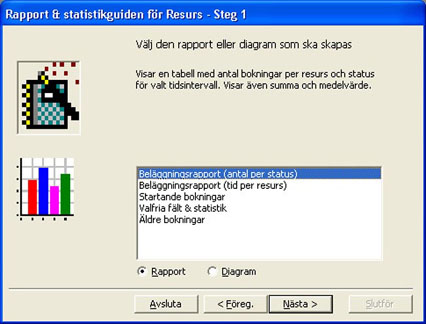
Then you select the report you want to produce
in the list. A description of the report is shown above the list
when you select the report.
If you click on the button 'Prev.'
you will go to the start page for the module. The button 'Next'
takes you to the next step and 'Cancel' will terminate
the module. |
|
|
| |
|
|
|
© 2010 Copyright
DataPartner |
|
|
You are here: Resource - Statistics
|
|